

For accounting firms, time is money, and losing hours to inefficiency can hurt your bottom line. When workflows aren't optimized, tasks are repeated, and deadlines are missed, leading to employee burnout.
The challenges are real: Manual data entry errors throw off financial reports, communication gaps between departments cause costly mistakes, and payment processor reconciliation can delay month-end close by days. Add inconsistent processes across teams and limited visibility into task status, and you've got a recipe for frustrated staff and unhappy clients.
Fortunately, these problems are fixable. With better workflows in place, you can reduce errors, move work along faster, and give your team the clarity they need to get things done, without the chaos.
What is an accounting workflow?
An accounting workflow is a systematic series of tasks and procedures that helps accounting firms manage operations from start to finish. It covers everything from data collection to report preparation.
Common examples include client onboarding, monthly bookkeeping, tax preparation, accounts payable, payroll processing, and month-end close, each with specific steps and dependencies we'll explore in detail below.
Standardized workflows ensure every task is completed in the right order, with checks in place to maintain consistency and accuracy. This translates directly into better business outcomes: fewer billing disputes due to errors, faster month-end close, improved cash flow visibility, and increased billable capacity. When your team follows the same process every time, you can onboard new staff faster, scale client volume without adding headcount, and maintain service quality even during peak seasons, all of which protect your margins and support sustainable growth.
Every effective accounting workflow includes these core elements:
Roles/owners: Define responsibility per task—who prepares, who reviews, who approves
Dependencies: Upstream/downstream task relationships that determine sequencing
Due dates: Standard SLAs and tolerance windows for each deliverable
Approval chains: Maker-checker patterns that ensure quality and segregation of duties
Audit trails: Required records for each step, including timestamps, approvals, and supporting documentation
Examples of accounting firm workflows
Well-run workflows make a big difference in how smoothly an accounting firm operates day to day. When your key processes are consistent, it’s easier to avoid errors, save time, and deliver a better client experience. Here’s a breakdown of the core workflows every firm should refine—covering both how you run the business and how you deliver your services:
Workflow name | Purpose | Key tools |
Client onboarding | Establish client relationships, set up systems, and migrate data | CRM, e-signature, document portal, practice management software |
Monthly bookkeeping | Maintain accurate financial records through transaction processing and reconciliation | Reconciliation tools, bank feed automation |
Tax preparation | Prepare and file tax returns while meeting IRS deadlines and quality standards | Tax software, document management system, e-signature |
Payroll processing | Process employee payments, maintain compliance, and reconcile accounts | Payroll, time tracking software |
Financial reporting and advisory | Provide insights beyond bookkeeping to support strategic decision-making | Reporting dashboards, BI tools, and financial planning software |
Accounts payable | Process vendor invoices, manage cash outflows, and maintain vendor relationships | Approval workflow software |
Accounts receivable | Generate invoices, collect payments, and manage client relationships | Invoicing software, payment processors, accounting software, and automated reminder systems |
Task management | Coordinate assignments, track deadlines, and manage dependencies across engagements | Practice management software, project management tools |
Client payment acceptance | Accept client payments, maintain compliance, and integrate with accounting | Payment processors, invoicing software, accounting software integration, and client portal |
Client onboarding workflow
The client onboarding workflow establishes the foundation for the entire client relationship, covering engagement letters, system setup, historical data migration, and initial deliverable scheduling. A smooth onboarding process sets clear expectations, prevents misunderstandings, and accelerates time-to-value for new clients.
Example workflow process:
Receive a lead inquiry and complete an initial consultation to assess fit, services needed, and budget.
Send and sign an engagement letter.
Add the client to your CRM or practice management system.
Request documents, including prior returns and financial statements.
Set up a client folder and provide access to the necessary systems.
Assign an internal owner or account manager
Hold a kickoff meeting to review timelines and communication protocols.
Key tools: CRM, e-signature (Docusign, Adobe Sign), document portal, practice management software Common bottleneck: Missing documents can delay onboarding.
Monthly bookkeeping workflow
A monthly bookkeeping workflow helps accountants maintain accurate, up-to-date financial records by systematically processing transactions, reconciling accounts, and generating financial statements. This workflow forms the foundation for tax preparation, financial analysis, and strategic decision-making.
Example workflow process:
Collect bank and credit card feeds and categorize transactions.
Reconcile accounts and review for discrepancies.
Adjust journal entries as needed to ensure accuracy.
Generate financial statements (P&L, balance sheet) and complete an internal review.
Deliver reports to the client with a summary of key findings.
Key tools: QuickBooks, Xero, Sage, reconciliation tools, bank feed automation Automation opportunity: Automated transaction categorization and bank feed syncing
Tax preparation workflow
The tax preparation workflow covers everything from document collection to e-filing, ensuring returns meet IRS deadlines and quality standards. Because deadlines are fixed, firms face intense seasonal workloads—especially between January and April (or October for extensions)—making capacity planning essential to balance high volume with consistent, high-quality review.
Example workflow process:
Send a tax organizer or checklist to the client and collect documents, including W-2s, 1099s, and relevant receipts.
Input data into tax software and review it for accuracy.
Send the return to the client for review and approval.
E-file the return.
Store all documents and confirmations to maintain a complete audit trail.
Key tools: Tax software (Drake, UltraTax, ProSeries, Lacerte), document management system, e-signature Common bottleneck: Delays in receiving client documents
Payroll processing workflow
The payroll processing workflow ensures employees are paid accurately and on time while staying compliant with tax, benefits, and labor requirements. Because payroll runs on a fixed schedule, it’s critical to have a reliable process and strong integration between payroll and accounting systems to support accurate reporting and reconciliation.
Example workflow process:
Collect employee hours from timesheets or payroll systems.
Validate the data, accounting for overtime, PTO, and bonuses.
Run payroll calculations and review the payroll summary.
Process payments.
File payroll taxes.
Generate reports for the client summarizing payroll activity.
Key tools: Gusto, ADP, Paychex, QuickBooks Payroll, time tracking software Risk areas: Compliance errors in tax filings; missed deadlines
Financial reporting and advisory workflow
Accounting professionals use reporting and advisory workflows to help clients get a deeper understanding of their financial situation and make strategic decisions based on what they learn. These workflows create opportunities for higher-value engagements and stronger client relationships, helping firms grow revenue and improve retention rates.
Example workflow process:
Analyze financial statements and identify trends in revenue, expenses, and margins.
Prepare dashboards and reports that highlight key insights and issues requiring attention.
Meet monthly or quarterly with clients to review findings and recommend actions, such as cost reduction or growth strategies.
Key tools: Reporting dashboards, Excel, business intelligence tools (Power BI, Tableau), financial planning software Value driver: Positions the firm to expand beyond compliance work and offer high-value advisory services
Accounts payable workflow
Accounting professionals use accounts payable (AP) workflows to manage vendor invoice processing, payment execution, and cash outflow management. Effective AP workflows protect cash flow, maintain vendor relationships, and ensure accurate expense recording.
Example workflow process:
Receive invoices from vendors.
Code expenses to the appropriate categories and accounts.
Route invoices for approval based on established dollar thresholds.
Schedule and process payments via ACH or check.
Record transactions and reconcile them with account statements.
Key tools: Bill.com, Melio, QuickBooks, approval workflow software Automation opportunity: Automated approval workflows and bill payment tools
Accounts receivable workflow
An accounts receivable (AR) workflow helps manage invoice generation, payment collection, and cash application. Strong AR workflows reduce days sales outstanding (DSO) and improve cash flow predictability.
Example workflow process:
Generate invoices and send them to clients.
Track outstanding balances and send reminders at defined intervals.
Apply payments as received.
Follow up on overdue accounts with escalating communication.
Key tools: Invoicing software, payment processors (8am™ CPACharge), accounting software, automated reminder systems Key metric: Days sales outstanding (DSO)
Task management workflow
The task management workflow keeps assignments, deadlines, and dependencies organized across all client work, helping ensure nothing slips through the cracks. Because it runs continuously across all services, the key is maintaining clarity as team members juggle multiple clients, priorities, and timelines.
Example workflow process:
Assign tasks by client, deadline, and service type.
Set due dates and priorities for each assignment.
Track task statuses (not started → in progress → review → complete)
Monitor workload capacity and report on team performance.
Key tools: Practice management software (Karbon, Jetpack Workflow), project management tools (Asana, Monday.com)
Client payment workflow
The client payment workflow supports multiple payment methods, helps maintain PCI compliance, ensures proper trust accounting separation, and integrates with the general ledger. This workflow can directly improve cash flow by enabling faster payment collection and reducing manual processing overhead.
Example workflow process:
Deliver invoices with embedded payment links.
Collect payment from the client via credit card or eCheck/ACH.
Send real-time payment notifications to the billing team and automatically apply cash to open invoices.
Sync transaction data to the firm’s accounting system.
Reconcile payments with the monthly processor fee statement.
Complete the month-end close integration.
CPACharge simplifies this workflow by consolidating fee deductions to monthly statements rather than per-transaction deductions, making reconciliation straightforward. The solution's integration with QuickBooks and other accounting software reduces manual data entry and provides itemized transaction records for audit trails.
Key tools: Payment processors (CPACharge), invoicing software, accounting software integration, client portal
Best practices for optimizing accounting workflows
Optimizing accounting workflows is crucial for making your firm more efficient, reducing errors, and keeping everything running smoothly. Here are practical steps to help improve your processes.
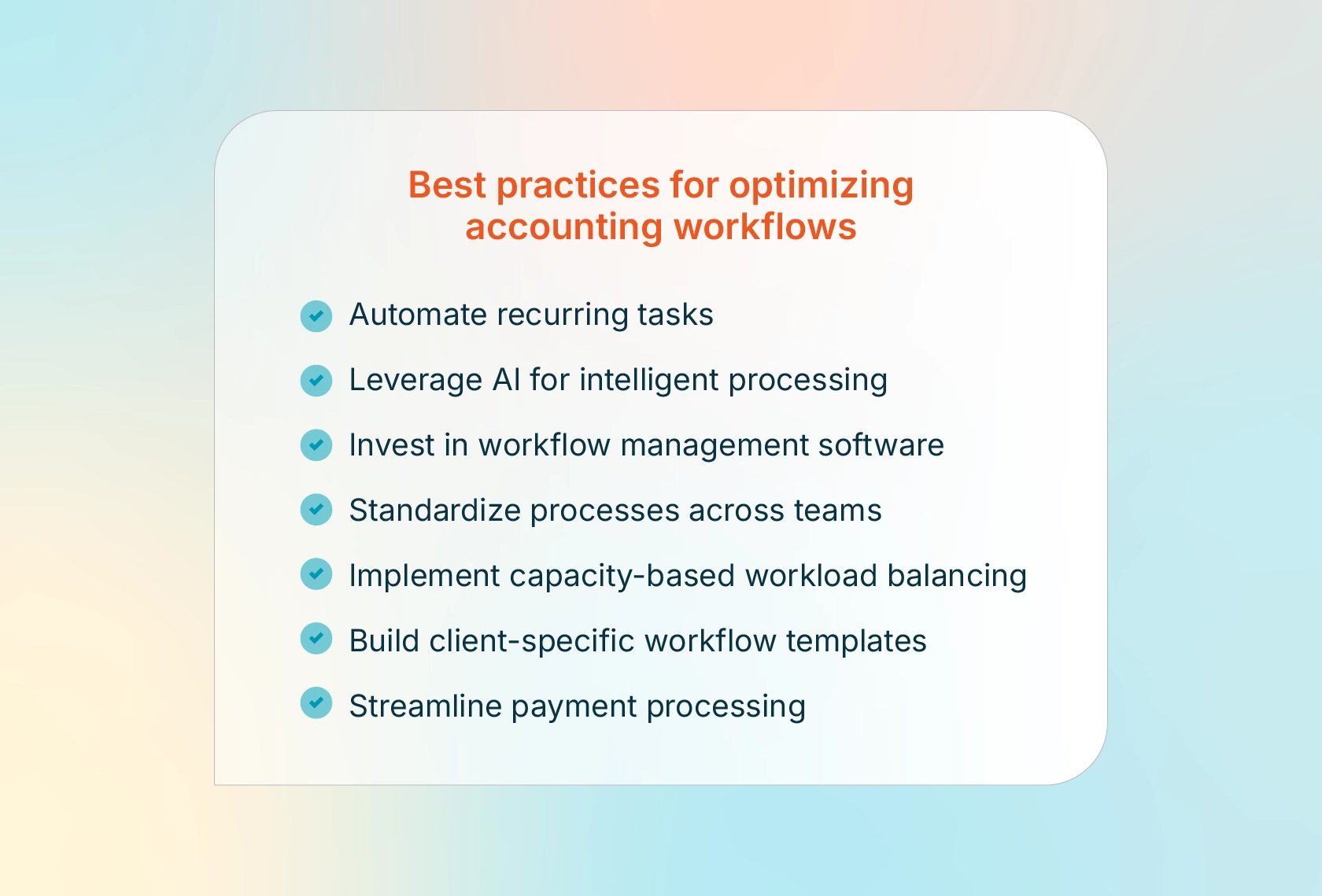
1. Automate recurring tasks
Workflow automation can make a big difference for your accounting firm by minimizing manual work on repetitive tasks such as data entry, invoicing, and bank reconciliations. This not only speeds up these processes but also reduces the chance of mistakes, which is key for staying accurate and compliant.
Tasks to automate:
Recurring journal entries and scheduled transactions
Reminder emails and follow-up sequences
Approval routing based on dollar thresholds or transaction types
Invoice capture via optical character recognition (OCR) and automatic general ledger (GL) coding
Bank feed matching and transaction categorization
Tasks requiring human review:
Journal entries with unusual amounts or new account codes
Exceptions flagged by automated matching rules
Vendor additions or changes to payment information
Payroll changes affecting employee compensation
Any transaction exceeding the defined materiality thresholds
Maker-checker controls remain essential even with automation. Establish approval queues in which one person prepares and another reviews before posting, to protect against errors and maintain audit trail integrity.
2. Leverage AI for intelligent processing
AI applications are transforming accounting workflows by handling tasks that previously required significant manual effort. OCR technology now extracts data from invoices and receipts with high accuracy, while AI-powered coding suggestions recommend GL accounts based on vendor history and transaction patterns.
Duplicate detection algorithms identify potential duplicate invoices before payment, preventing costly errors. Anomaly detection flags unusual expense patterns or transactions that fall outside normal parameters for review.
Specific use cases include:
Anomaly detection in expense reports, identifying unusual spending patterns
Predictive cash flow modeling based on historical payment patterns
Intelligent document classification, routing incoming documents to appropriate workflows
3. Invest in workflow management software
Using accounting workflow software to organize your processes and centralize data makes it easier for your team to collaborate. These tools help you assign, track, and complete tasks efficiently while giving you a clear view of the entire workflow.
Feature checklist for evaluation:
Recurring work templates and task dependencies
Multi-level approval workflows with audit trails
Real-time dashboards and capacity tracking
Client portal with e-signature integration
GL, payroll, and bank integrations
4. Standardize processes across teams
Having a standardized accounting process across your firm brings consistency and efficiency. To standardize your processes, start by creating clear, documented workflows for key tasks like client onboarding or monthly financial closing. Make sure these workflows are easily accessible to all staff members. Regular training sessions can help ensure everyone understands and follows the standardized procedures. Using templates for common tasks, like invoicing or financial reporting, also helps maintain consistency and quality.
With a standardized process, you can improve work quality, reduce new-hire training time, and provide a more consistent experience for your clients.
5. Implement capacity-based workload balancing
Capacity planning prevents burnout and ensures consistent service quality. Start by calculating standard time budgets by service line:
Estimate tax preparation hours based on return complexity, such as simple vs. complex 1040s and business returns by entity type.
Determine monthly close hours based on client size and industry.
Calculate payroll processing time based on employee count.
Workload distribution strategies during peak seasons:
Tax season capacity allocation: Reserve partner review time in advance
Year-end close surge planning: Stagger client close dates where possible
Quarterly deadline clustering: Spread estimated tax and compliance work
Build real-time capacity dashboards showing full-time employee (FTE) utilization by service line, engagement type, and deadline proximity. Set warning thresholds to trigger reallocation discussions before team members become overloaded.
Staff development considerations include balancing workload with training time and planning progression from staff to senior responsibilities. Ensure managers and partners have adequate review capacity to prevent bottlenecks.
6. Build client-specific workflow templates
Creating reusable workflow templates by client segment can help improve consistency and reduce setup time for new engagements.
Recommended templates by client type:
Small business bookkeeping: Monthly close, payroll, sales tax filing
Mid-market clients: Consolidated reporting, multi-entity accounting, intercompany eliminations
High-net-worth individuals: Investment tracking, trust accounting, estate planning coordination
Industry-specific workflows:
Restaurant clients: Daily sales reconciliation, tip reporting, and inventory tracking
Professional services: work-in-progress (WIP) tracking, project-based billing, utilization reporting
Retail/e-commerce: Multi-channel sales reconciliation, inventory management, marketplace fee tracking
Onboarding workflow templates:
New client intake checklist
Chart of accounts setup and customization
Historical data migration procedures
Recurring deliverable scheduling
Set standards for template customization by identifying which steps are required for compliance and quality, and then determine where client preferences can be accommodated. Use version control and conduct an annual template review to document lessons learned, regulatory changes, and efficiency improvements.
7. Streamline payment processing
Payment processor integration directly impacts month-end close efficiency. When payment data flows automatically into your accounting system, reconciliation becomes straightforward rather than a time-consuming ordeal.
CPACharge offers a monthly fee deduction to help avoid per-transaction surprises that can complicate reconciliation. Instead of tracking fees for each transaction, firms receive a single monthly statement with itemized details.
Step-by-step client payment workflow with CPACharge:
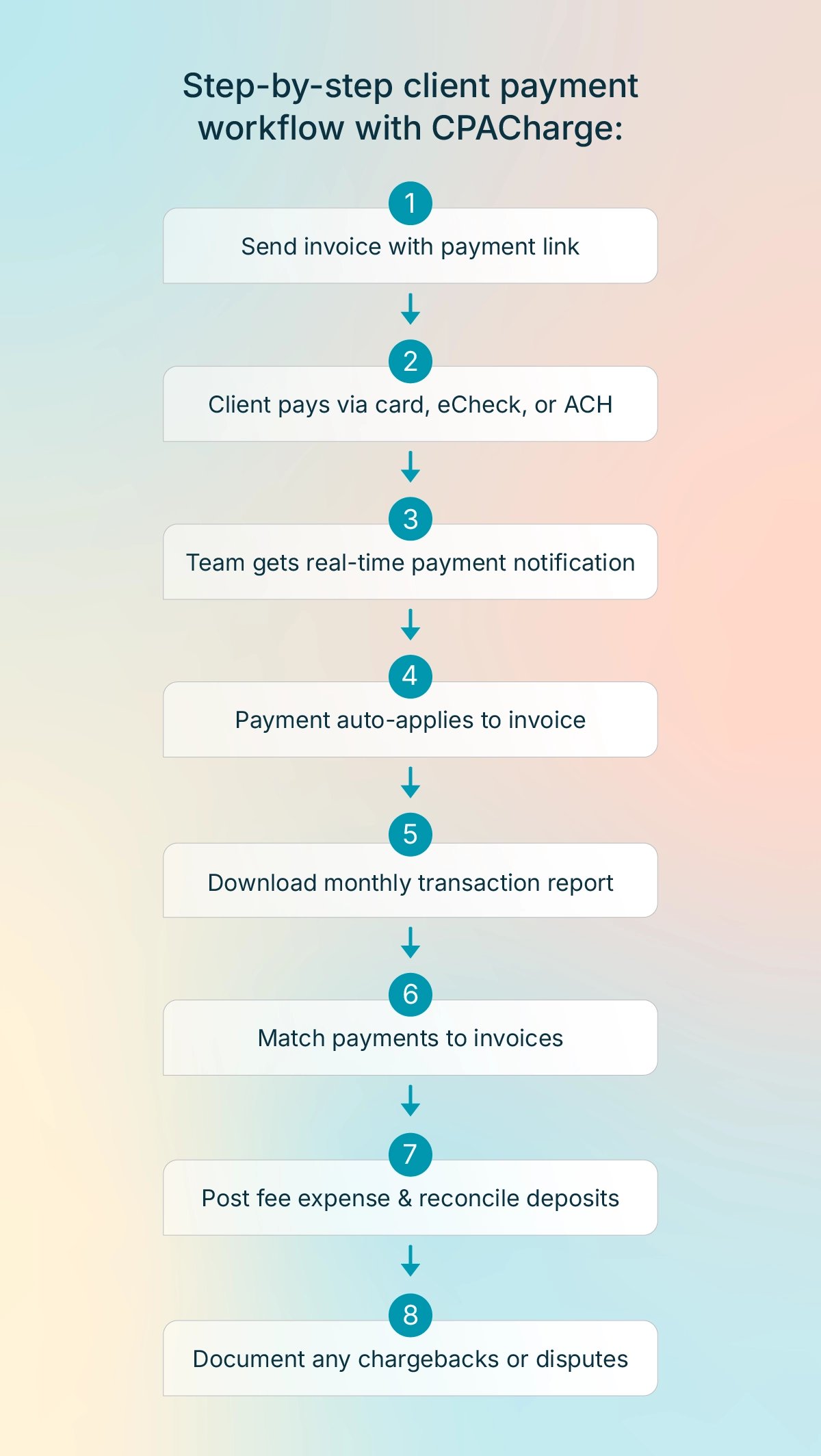
Generate an invoice with an embedded CPACharge payment link.
The client receives the invoice and pays via credit card, eCheck, or ACH through a secure payment portal.
CPACharge sends a real-time payment notification to your billing team.
The payment automatically applies to the open invoice in your accounting system.
Download the monthly transaction report from the CPACharge dashboard for reconciliation.
Match gross payment amounts to invoices and verify the monthly fee statement against expected processing costs.
Post a single monthly fee expense entry and reconcile bank deposits to net payment amounts.
Document any chargebacks or disputes, including supporting records, for an audit trail.
Improve accounting firm payment workflows with CPACharge
Effective payment processing workflows help accounting firms run smoothly, maintain predictable cash flow, and complete reconciliation in minutes instead of hours. CPACharge is built specifically for accounting firms, with integrations and features designed around how you actually work, including:
15+ integrations with QuickBooks, Xero, TaxDome, and more: Payment data syncs automatically to your accounting system, minimizing manual entry.
Next-day payments: Get funds deposited the next business day instead of waiting two to three days.
Quick Bills for instant payment requests: Send payment links in seconds without generating formal invoices.
Real-time invoice tracking: See when clients open invoices, and configure automated payment reminders.
2× industry-average chargeback reversal rate: Itemized invoicing and authorization timestamps provide the documentation you need to win disputes.
Consolidated monthly fee statements: Receiving one monthly statement instead of per-transaction deductions saves time and simplifies the reconciliation process.
PCI Level 1 compliance built-in: The highest level of payment security protects your firm and clients without requiring in-house security expertise.
Ready to streamline your payment workflows? Get started with CPACharge today.
About the author

Mary Elizabeth HammondSenior Content Strategist and Blog Specialist8am
Mary Elizabeth Hammond is a Senior Content Strategist and Blog Specialist for 8am, a leading professional business solution. She covers emerging legal technology, financial wellness for law firms, the latest industry trends, and more.